Digital receptionist for local businesses
You help your customer. Meanwhile, NoLeadLost answers questions and books appointments.
A chat on your website that answers customers with your prices, services and opening hours, and puts appointments straight into your calendar. Also in the evening and at weekends. You see every conversation and take over whenever you want.
For garages, plumbers, salons, electricians, builders, estate agents and clinics.
A short intro call by phone or video. No commitment.
Our own website runs on NoLeadLost: the chat you open here is the product itself.
- Installed and set up for you
- No technical work on your side
- 12-month plan or cancel monthly
On the website of Garage Van Dijk, a customer asks in the chat what a minor service costs. The assistant answers: from €149. The customer asks when it can be done; the assistant offers Thursday at 09:30, 11:00 or 16:00. The customer picks 09:30 and gives a name and phone number, and the assistant confirms the appointment.
How it works
This is how a conversation goes, for example at a garage.
A customer asks a question in the chat on the garage's website. These are the four steps you also see in the recording.
- Step 1Example
The customer asks
Customer: How much is a minor service?
Simply in the chat on the website, at any time of day.
- Step 2Example
An answer from their own price list
NoLeadLost: A minor service starts at €149, depending on your car. Shall I check when we have a free slot?
The price comes from the price list the garage entered itself, as a 'from' price. No made-up amounts.
- Step 3Example
Free times from the calendar
NoLeadLost: Thursday works at 09:30, 11:00 or 16:00. Which time suits you?
Only times that are free in the garage's calendar, with enough time for a minor service.
- Step 4Example
Booked and confirmed
NoLeadLost: Thank you! Your appointment is on Thursday at 09:30.
The customer leaves a name and phone number. The appointment is in the calendar, the customer gets a confirmation and the garage a notification.
An example garage with a made-up price list and calendar. For your business, prices and times come from your own price list and calendar.
The problem
A customer who gets no answer calls the next business.
You're good at your job, and that's what you spend your day on. Meanwhile, questions go unanswered, and you only notice when your calendar is emptier than expected.
Your hands are full
Under a car, up a ladder or with a client in the chair. The phone and email have to wait.
Customers search in the evening
Many enquiries come in after closing time. Customers often book with whoever replies first.
Follow-ups slip
Chasing a quote or sending a reminder matters, but it often doesn't happen.
What it does
Reachable while you are busy, with appointments straight into your calendar.
Answers questions with your information
About your services, prices, opening hours, parking or warranty. NoLeadLost uses what you gave it, in the tone that suits your business.
- Replies within seconds, also in the evening and at weekends
- Asks the follow-up questions that fit your trade
- Says honestly when it doesn't know
Books appointments in your calendar
It offers times that work: within your opening hours, with the right person and with enough time for the job. The customer gets a confirmation, you get a notification.
- Respects schedules, breaks and holidays
- The right duration for each service
- Works with Google Calendar, Outlook and Apple Calendar
Confirmations and follow-ups
After booking, the customer gets a confirmation and a reminder before the appointment, by email or SMS. Growth and Pro go further: a message after a quote, a new offer after a no-show and a review request when the job is done. As soon as the customer replies, those messages stop.
- Booking confirmations and reminders: all plans
- SMS with a monthly bundle, customers can reply
- Follow-up sequences: Growth and Pro
Everything in one place
Every conversation, request, appointment, quote and callback in one overview. Urgent requests are at the top, so you see which customers are waiting for you.
- Photos customers send, kept with the request
- Quotes customers accept online
- Numbers from your own data
Checks
What it checks, and when it brings you in.
No promise that nothing ever goes wrong, but checks you can verify.
When booking an appointment
- It only offers times that are free: within your opening hours and schedules, with the length of the service and without overlapping appointments already booked.
- Connect your Google Calendar or Outlook and your own appointments there count as busy too. Those busy times are fetched about every 15 minutes.
- At the moment of booking the time is checked again. If someone else has just taken it, the booking does not go through and the customer is offered another time.
When it hands over to you or your team
- When it isn't sure of the answer. It tells the customer honestly and you get a notification.
- When the customer asks to speak to a person.
- In an emergency, such as a gas smell or a breakdown on the road: first brief safety advice, then straight to you.
- With a complaint or an unhappy customer.
- For custom work or a large job. It doesn't agree discounts or fixed prices: it only gives 'from' prices from your price list.
You see every conversation as it happens and take over with one click. Afterwards you hand it back if you want.
You stay in control
You decide what it says and what it may do.
Your information
Your website, price list and terms are the basis. If it doesn't know something, the question comes to you and you add the answer.
Your rules
Tone of voice, house rules, whether to mention prices and whether it may book on its own: you set it.
Your team and schedules
Schedules, days off and who does which service. Appointments go to the right person.
Honest with customers
It says it is a digital assistant. Payment card numbers and passwords are masked automatically.
Works on any website
Light, fast and in your own colours. It only runs on the domains you allow.
Your data
Your customer data belongs to you. You can export everything or erase a customer's data yourself.
The dashboard
See the dashboard
This is where you read along, step in and keep track of appointments and quotes.
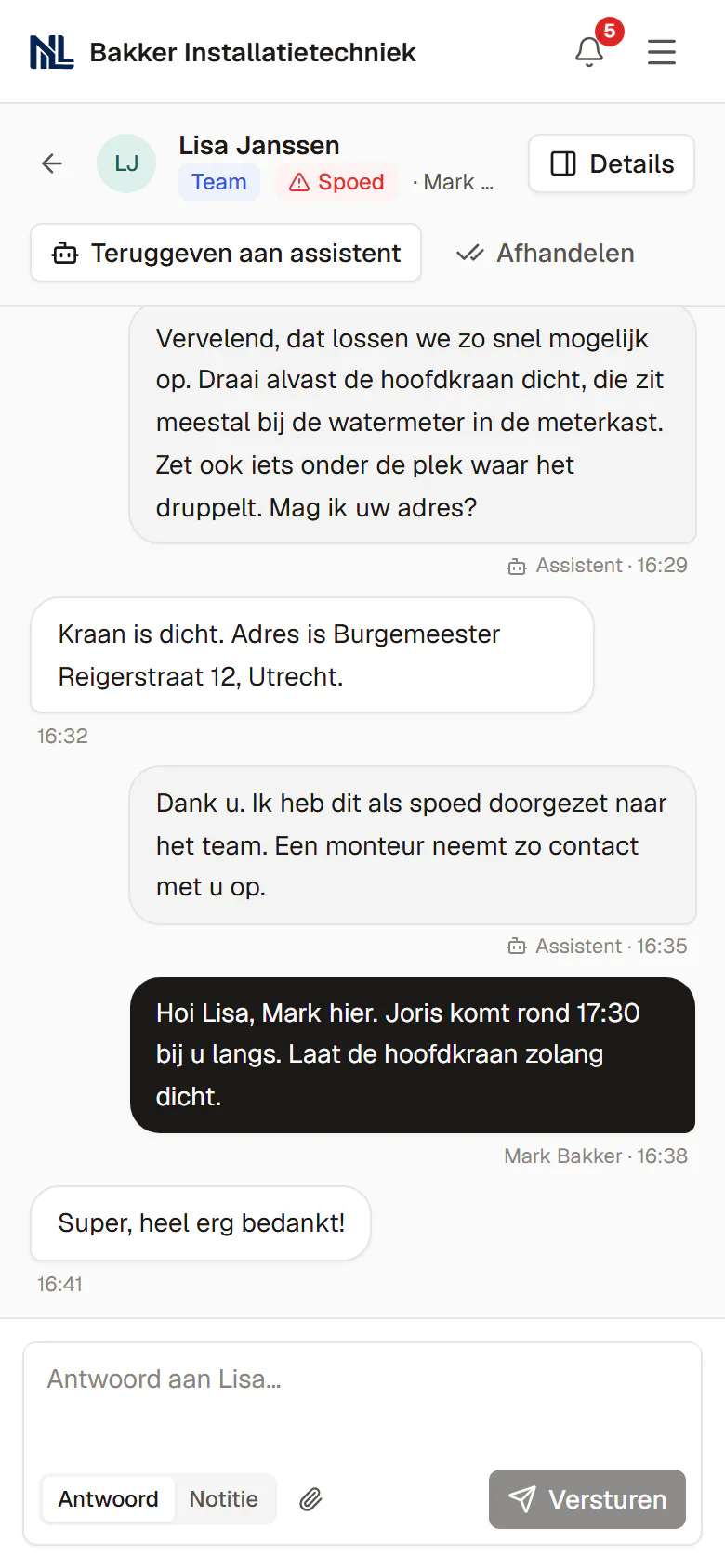
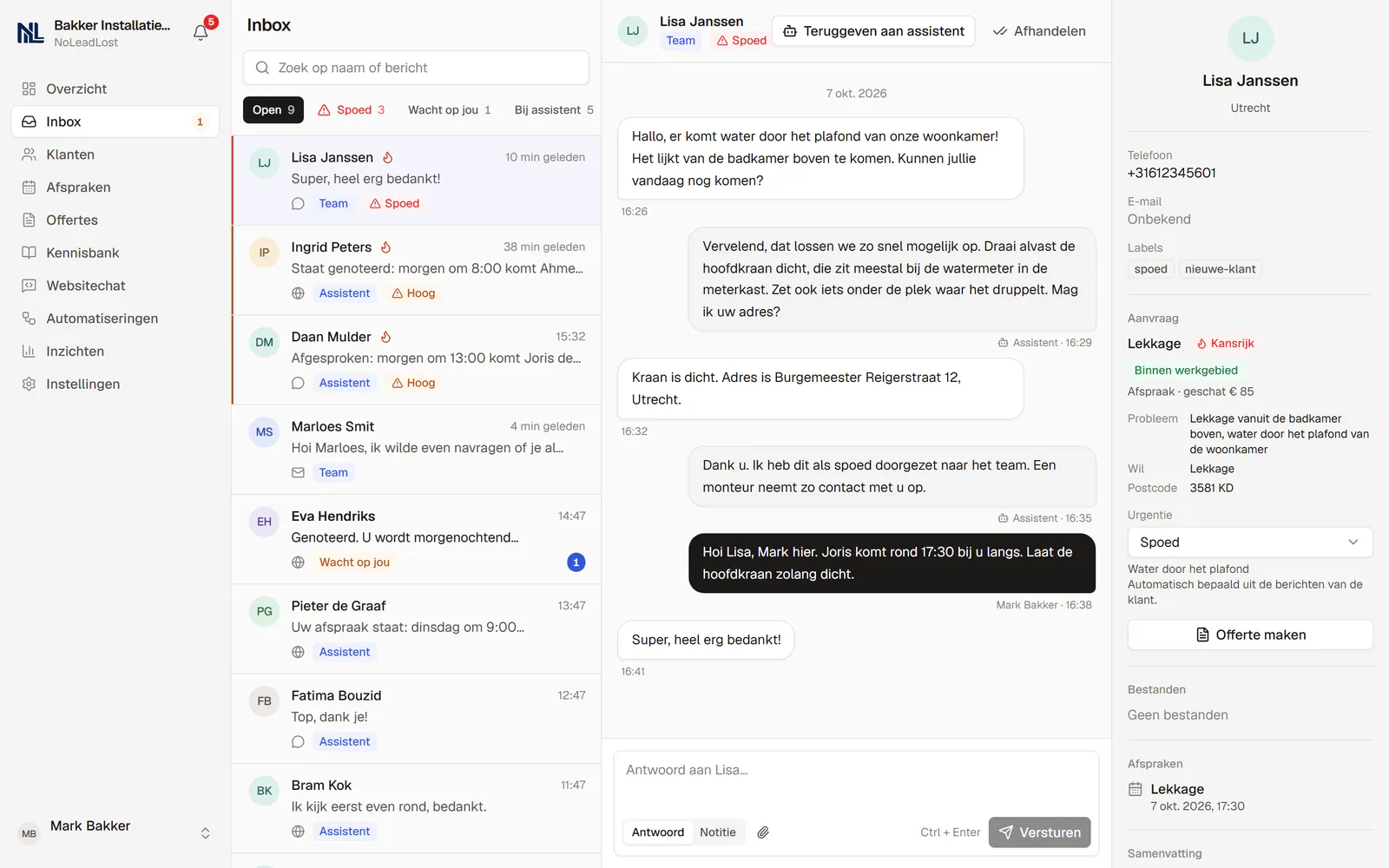
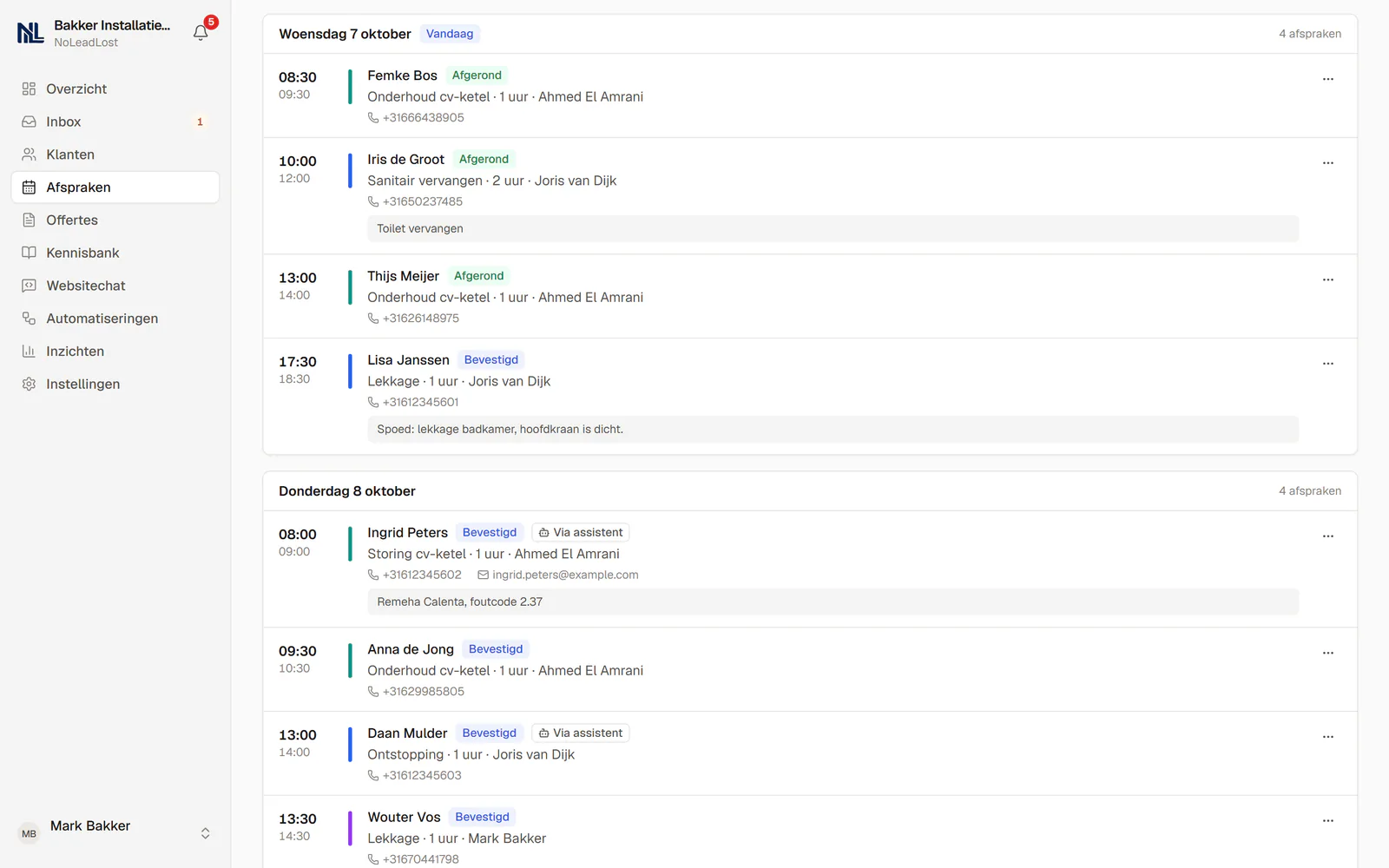
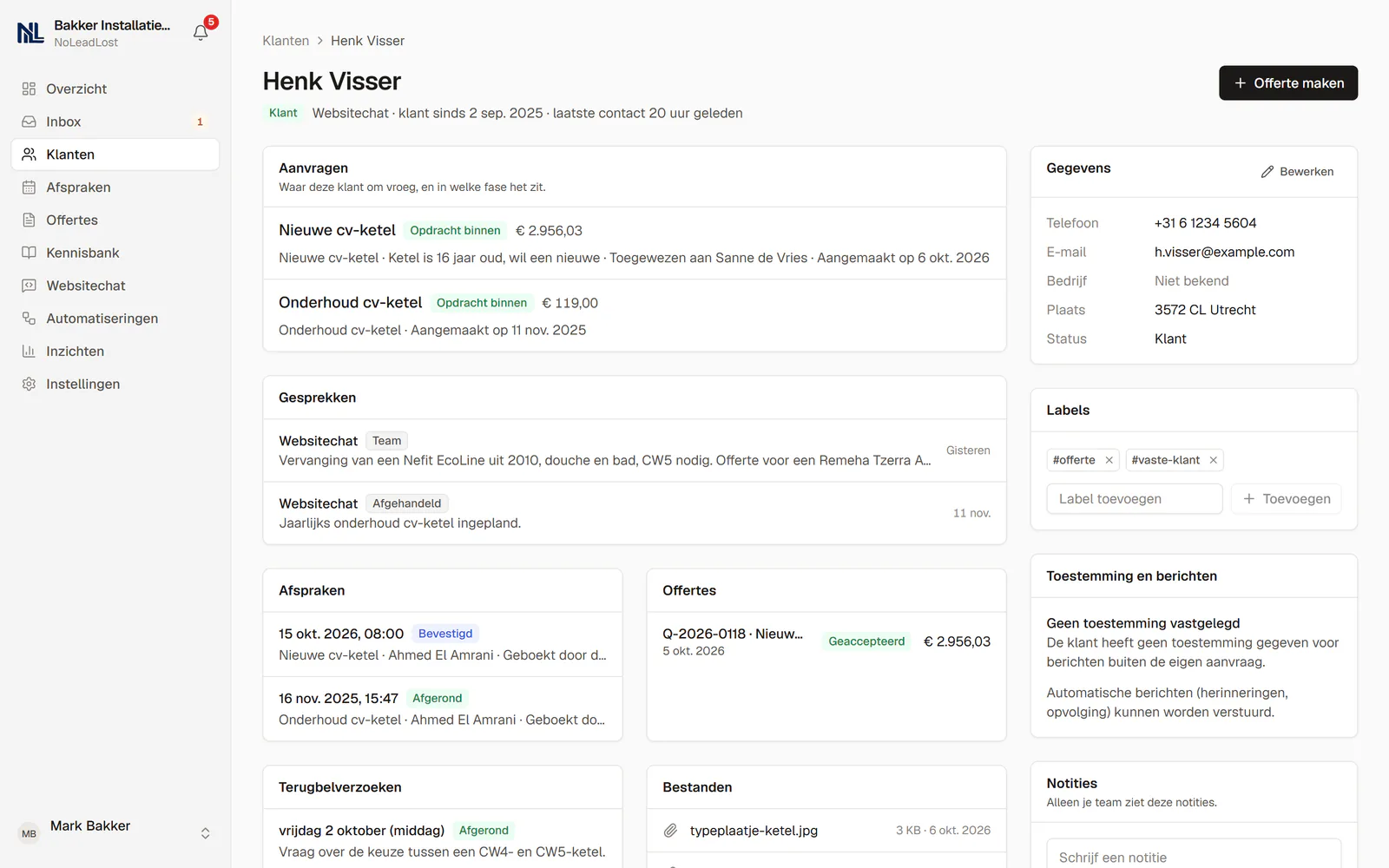
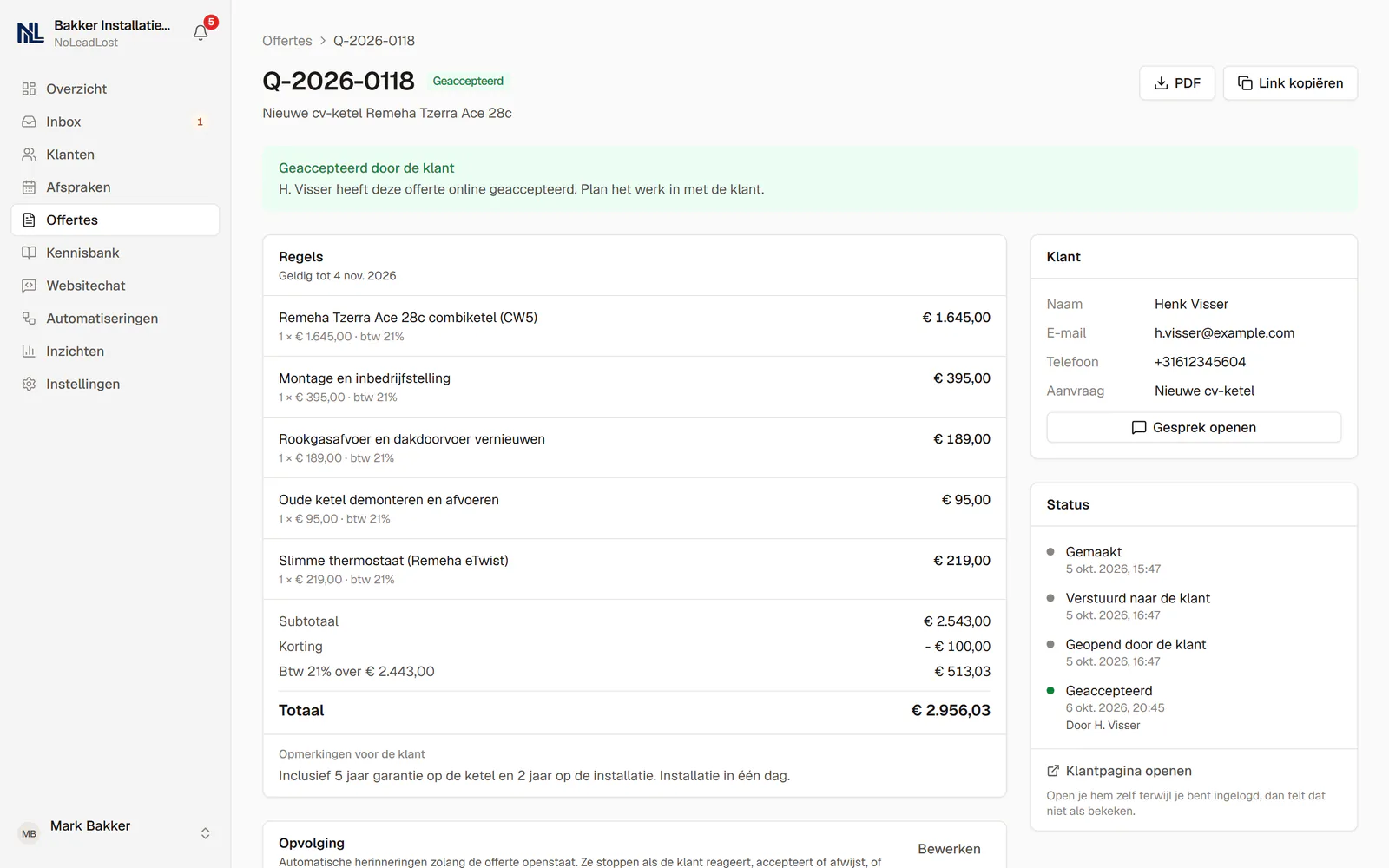
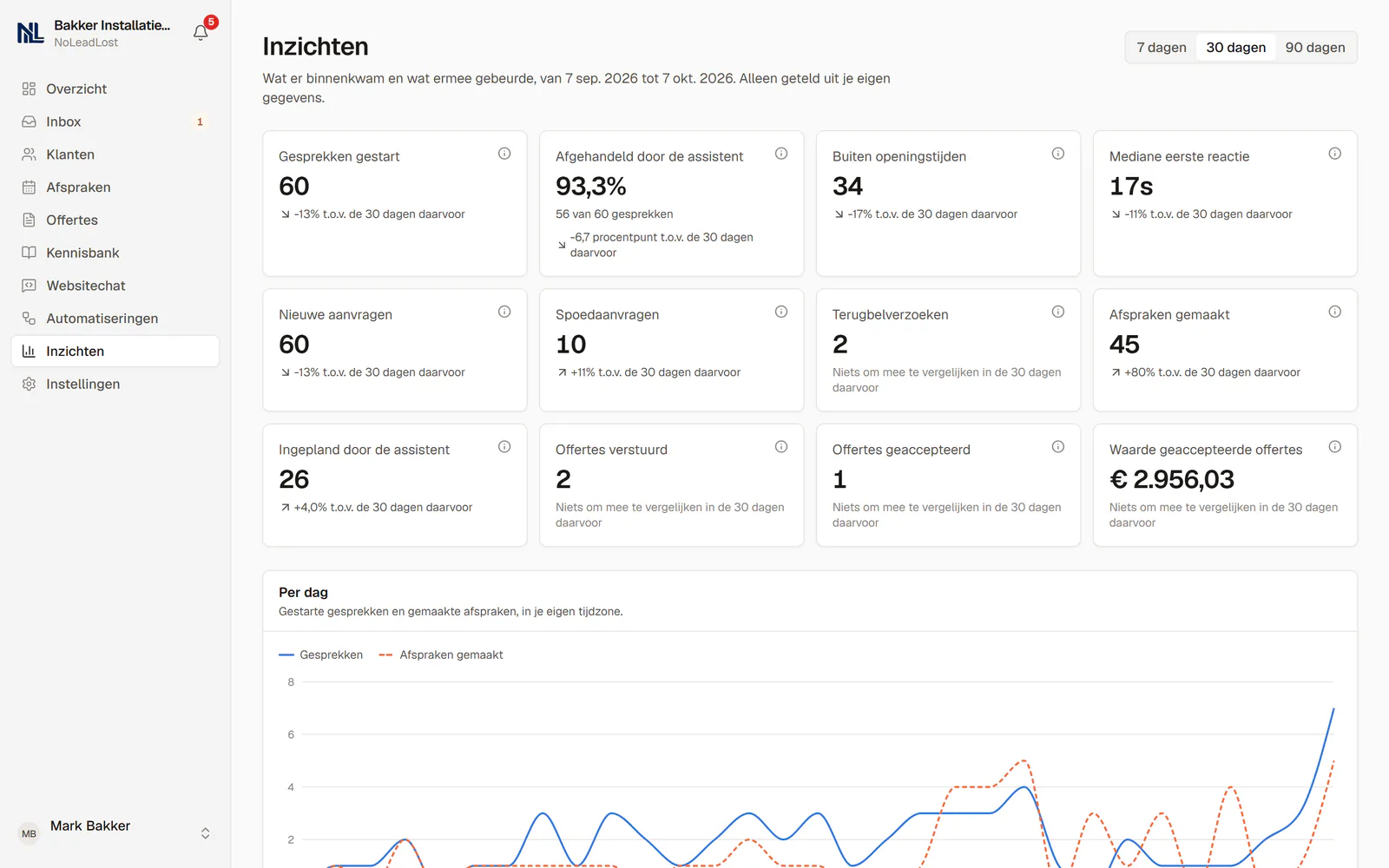
Screens from the real dashboard with an example business in Utrecht, so they show the Dutch version of the dashboard. The dashboard is also available in English. Names and details are made up.
Who installs it
Set up personally, together with you.
Why NoLeadLost exists
“Business owners are busy doing the work. That is exactly why enquiries get missed. I want no customer to walk away because nobody answered.”
As a business owner you can't do your work and answer every customer straight away at the same time. Yet one missed message can mean someone goes elsewhere. That's why I built this platform: to answer questions and arrange appointments, even when you're busy or your working day is over. I want to give business owners more peace of mind, without their customers having to wait.
Nouri Kuyl · Founder
More about usHow the installation works
You don't set anything up yourself. Nouri Kuyl sets up NoLeadLost together with you. This is how it goes:
Intro and intake
We talk about your business, your services and how customers reach you today, and pick a plan together. You pay the setup fee up front.
Everything set up
Opening hours, schedules, services and prices. We put the information from your website, your price list and your frequently asked questions in the knowledge base.
The chat on your website
We install the chat on your website, in your own colours. It works with WordPress, Wix, Shopify, Squarespace, Webflow and other websites.
Testing together
We run test conversations together and adjust what can be better, before customers see the chat.
Live
You receive an invitation to your dashboard, ready to use. The monthly fee starts from then.
After going live
We make small changes to your information for you, and you can email us with questions. We keep an eye on whether everything keeps working.
Industries
It knows your trade.
For each industry, the usual services, prices, follow-up questions and urgency rules are prepared. We adjust them to your business during the installation.
Garage / auto repair
Prepared services
MOT / inspection, Service, Diagnostics, Tyre change, Air conditioning service, Brakes
House rule, for example
Once the appointment is booked, ask for the registration number (never make it a condition for offering or booking a time).
Plumbing / heating
Prepared services
Boiler repair, Boiler service, New boiler, Leak repair
House rule, for example
For a fault, ask for the boiler make, model and the error code on the display.
Electrician
Prepared services
Fault finding, Fuse box replacement, EV charger installation
House rule, for example
For a fault, ask whether the residual current device (RCD) has tripped.
Real estate agency
Prepared services
Free valuation, Viewing, Buying support
House rule, for example
For a sales enquiry, ask for the address and when they'd like to sell.
Hair salon / beauty
Prepared services
Women's cut, Men's cut, Colour, Facial
House rule, for example
For a colour treatment, ask whether the customer has had colour done with us before.
Dental practice
Prepared services
Check-up, Hygienist, Emergency appointment
House rule, for example
Never give medical advice or diagnoses; refer to an appointment.
Physiotherapy
Prepared services
Intake, Treatment
House rule, for example
Don't make medical claims about recovery or results.
Construction / renovation
Prepared services
On-site quote, Renovation, Roofing
House rule, for example
Don't give a total price without a site visit.
Driving school
Prepared services
Trial lesson, Lesson package
House rule, for example
Ask whether the customer has passed the theory test.
Cleaning services
Prepared services
Office cleaning, Window cleaning, End-of-tenancy cleaning
House rule, for example
Ask for the floor area in square metres to give a price indication.
Restaurant
Prepared services
Table reservation, Group dinner
House rule, for example
Always ask for the number of guests and any allergies.
Web / marketing agency
Prepared services
Introductory call, Website, SEO
House rule, for example
Ask about budget and the desired delivery date.
Another kind of business?
Any local business that takes questions and appointments can use it. We set up your services and rules with you during the installation.
Do the maths
What does a missed enquiry cost you?
Enter your own numbers and see what unanswered questions could cost you each month.
Possible missed revenue per month
€780
That is about 13 enquiries a month that go unanswered or get a reply too late.
An estimate based on your own numbers, not a guarantee.
Pricing
Set up once. Then one fixed monthly fee.
We set everything up with you: your services, FAQ, website install and a test run. You pay the setup fee once before the installation, and the monthly fee from the day you go live.
Lower setup fee with a minimum term of 12 months. After that it continues monthly and you can cancel per month. The monthly fee is the same either way.
Starter
For a single location that wants every website question answered.
€195one-time setup
then €49/month
Setup €195 with a 12-month plan, or €395 cancel monthly. Excl. VAT or sales tax.
Questions first? Book a free 15-minute call
Every month
- Website chat
- 500 conversations per month
- Online booking in your calendar
- Sync with Google Calendar, Outlook or Apple Calendar
- Booking confirmations and reminders
- 100 SMS per month included
- Customer overview
- 2 users
Setup, done with you
- Your business details, services and prices
- Opening hours and staff schedules
- Knowledge base with your FAQ
- Chat installed on your website
- A test run together before going live
Growth
For teams handling enquiries through their website and WhatsApp.
€395one-time setup
then €99/month
Setup €395 with a 12-month plan, or €595 cancel monthly. Excl. VAT or sales tax.
Questions first? Book a free 15-minute call
Every month
- Everything in Starter
- 2,500 conversations per month
- 300 SMS per month included
- Follow-ups for no-shows, quotes and quiet customers
- Review requests and rebooking offers
- Up to 10 users
Setup, done with you
- Everything in the Starter setup
- WhatsApp connected
- Follow-up sequences configured
Pro
For businesses with several locations and a high volume of enquiries.
€795one-time setup
then €199/month
Setup €795 with a 12-month plan, or €995 cancel monthly. Excl. VAT or sales tax.
Questions first? Book a free 15-minute call
Every month
- Everything in Growth
- 10,000 conversations per month
- 1,000 SMS per month included
- Up to 50 users
- Priority support
- A training call with your team
Setup, done with you
- Everything in the Growth setup
- A training call with your team
A conversation is one customer chat or email thread; replies within it are free. Over your limit? We'll let you know and suggest the next plan; your chat keeps working. Prices in EUR. VAT or sales tax is added where applicable.
What is NoLeadLost, in one sentence?
A chat on your website that answers customer questions with your own information and books appointments straight into your calendar, also when you're busy or closed.
What does it cost?
A one-time setup fee and a fixed monthly fee, depending on the plan. Starter is €49 per month, with a setup fee of €195 on a 12-month plan or €395 if you want to cancel monthly. Prices in EUR. VAT or sales tax is added where applicable. Within your plan there is no charge per conversation.
What counts as a conversation?
A conversation is one customer chat or email thread; replies within it are free. If you go over your plan's limit, we'll let you know and suggest the next plan; your chat keeps working.
Can I talk to someone first?
Yes. Book a free 15-minute intro call and choose a time that suits you. We call you on the number you leave, or send a video link by email. We answer your questions and tell you honestly whether NoLeadLost fits your business. No commitment.
Do I set it up myself or do you?
We do, together with you. You request an installation, we plan it with you and set everything up: your services and prices, opening hours and staff, your FAQ, the install on your website and a test run together before it goes live. Then you receive an invitation and log in to a dashboard that is ready to use.
What do I get for the setup fee?
The full setup, done with you: your business details, services and prices, opening hours and staff, and a knowledge base with your frequently asked questions. We install the chat on your website and test it together with you before it goes live. You pay the setup fee once.
Are confirmations and reminders included?
Yes. Booking confirmations and appointment reminders are included in every plan. Follow-up sequences, for no-shows, open quotes and customers who went quiet, are part of Growth and Pro.
Am I tied to a contract?
You choose. You pay the setup fee once, before the installation, and the monthly fee from the day you go live. With a 12-month plan the setup fee is lower and the minimum term is 12 months. After 12 months it continues monthly and you can cancel per month. If you cancel within the first 12 months, the remaining months of the term are still due. If you prefer no minimum term, you pay the higher setup fee and can cancel at the end of any month.
Does it work with my website?
Yes. The chat works on any website where you can add a small piece of code, such as WordPress, Wix, Shopify, Squarespace and Webflow. We install it for you during setup.
What if the assistant doesn't know the answer?
Then it tells the customer so and hands the conversation to you. You get a notification and answer yourself. You can then add the answer to your knowledge base, so the assistant knows it next time.
Can I step into a conversation myself?
Yes, at any moment. You can read every conversation as it happens, take it over with one click and hand it back to the assistant afterwards. You also decide what the assistant may do, such as booking on its own or mentioning prices.
Does it connect to Google Calendar or Outlook?
Yes. Appointments show up in your Google Calendar, Outlook or Apple Calendar. When you connect your own calendar, busy times in it count as booked and the assistant doesn't offer them. At the moment of booking the time is checked once more. Calendar sync is included in every plan.
Which languages does it speak?
You choose the language your customers are served in: English, Dutch, German, French, Spanish, Italian or Portuguese. The chat window, emails and reminders follow that choice.
Can it send text messages (SMS)?
Yes. Customers can get appointment confirmations and reminders by text message, and they can reply to them. Every plan includes a number of SMS messages per month: 100 with Starter, 300 with Growth, 1,000 with Pro.
How does the assistant know when I'm available?
It uses your opening hours, your staff schedules, the length of each service and the appointments already booked, plus the busy times in your own calendar when it is connected. You add holidays and days off once. At the moment of booking the time is checked again, so a time someone else has just taken isn't booked a second time.
Will customers know they're talking to a digital assistant?
Yes, on purpose. The assistant says it is digital, uses the tone you choose and passes the conversation to a person when a customer asks for one.
What happens to my customers' data?
It is only used to help your customers. We don't sell anything and only share data with the providers needed to run the service, such as hosting, email delivery and the language model. Payment card numbers and passwords are automatically masked in chats. You can export all your data or erase a customer's data yourself under Settings, and we help with any other request.
Stop missing customers.
Start with a free 15-minute call. We answer your questions and tell you honestly whether NoLeadLost fits your business. No commitment.